Tool guides
Claude Code’s new sessions: learn to delegate one useful project
Try Claude Code’s desktop and cloud updates with a small FAQ project. Learn what to delegate, how to write the brief, and how to check the result.
In this guide
- How should a beginner try Claude Code’s new sessions?
- First, know which Claude experience you are using
- Make a tiny practice project
- Split the review by responsibility
- Use side questions to learn without losing the task
- Check the result against your known gaps
- When would you move work to the cloud?
- Your finish line
- Questions you might be asking
- Sources and further reading
How should a beginner try Claude Code’s new sessions?
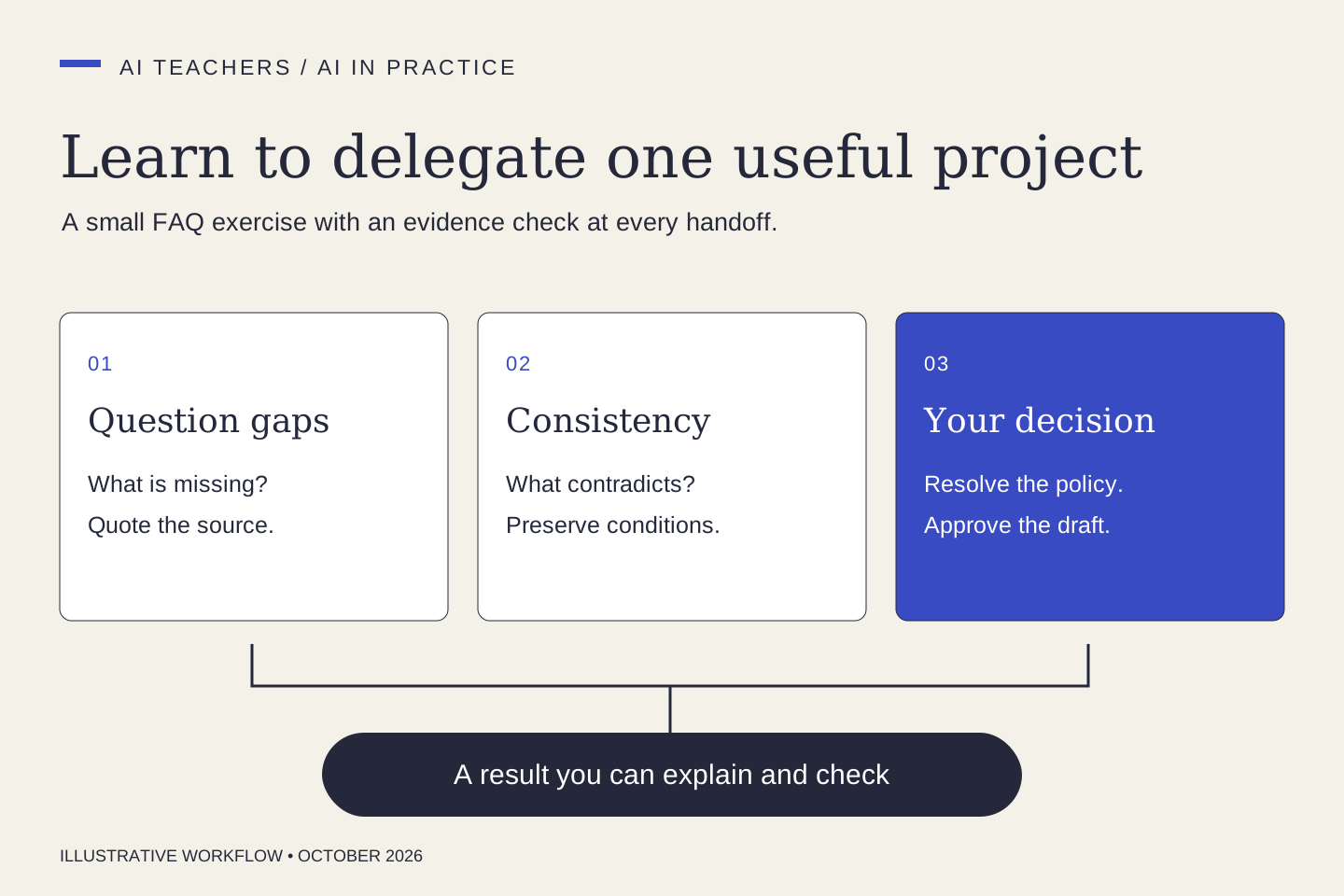
Choose a small project you can judge, give each task a separate output, and review the results together. Start with a practice FAQ: one task finds missing answers, another checks contradictions, and you decide which changes belong in the final draft.
A useful way to learn an AI tool is to give it work you already understand. You can spot an invented policy or a missing answer in your own FAQ more easily than you can judge unfamiliar code.
Anthropic’s October 17, 2026 Claude Code newsletter describes a refreshed desktop session screen, reusable environments, nested parallel sessions, and a separate tab for /btw side questions. The opportunity for a learner is practical: make the assignment smaller, then inspect what each part produced.
This exercise is an original AI Teachers lesson inspired by that update. It does not require connecting your inbox, changing your website, or creating a recurring agent.
First, know which Claude experience you are using
Claude Desktop has Chat, Cowork, and Code experiences. This guide concerns the Code tab, which works with a project folder and can change files or run commands. If your only goal is a one-off text review, a chat with an attached document may be enough. Use this exercise when you want to learn project-based work and reviewable file changes.
Update through Anthropic’s official app, select a practice folder, and review the available permission settings. Start with a plan or read-only review. Product labels and access can differ by version and account; use the linked desktop documentation for setup.
Make a tiny practice project
Create a folder with three short documents: a service description, its FAQ, and a list of customer questions. Use invented material and label it fictional. Here is a deliberately incomplete example:
- Service description: a fictional studio offers one homepage copy review, delivered within five business days after it receives the brief.
- FAQ: delivery takes five days, and the package includes a revision.
- Customer questions: does the turnaround include weekends, when does the clock start, and how many revisions are included?
The documents contain a contradiction about timing and an unanswered question about revision scope. You already know what a useful review should notice.
Split the review by responsibility
Ask for two independent outputs. The first review checks whether each customer question has an answer. The second compares the FAQ with the service description. Neither reviewer should rewrite the original documents.
Give the outputs distinct filenames, such as question-gaps.md and consistency-review.md. A small review does not always need parallel work. If creating separate sessions adds more effort than it saves, do the steps in one conversation. Learning to choose is part of the exercise.
Review this fictional practice folder. If the tasks are suitable for parallel sessions, give one session the customer-question coverage review and another the consistency review. Each must quote the supporting passage, name the file, and distinguish missing information from a contradiction. Write to separate review files. Do not edit the source documents or invent policies. Bring both findings back into one list of decisions for me.
Use side questions to learn without losing the task
If a term is unfamiliar, ask a short side question such as /btw What is a Git worktree, in plain English? Keep the actual review brief focused. You can return to your learning notes after deciding whether the findings are correct.
The valuable habit is explaining what you are approving. Before accepting a proposed sentence, say why the source supports it. If you cannot explain that connection, investigate before using it.
Check the result against your known gaps
A strong result should flag that “five days” lost both the business-day condition and the requirement to receive the brief. It should also identify revision scope as unresolved. “One revision” would be an invented answer unless your approved material establishes it.
Now make a real decision: set a fictional revision policy, clearly label it as your decision, and ask Claude to draft the updated FAQ. This is the point where new information enters the project. The model should not quietly make that decision for you.
When would you move work to the cloud?
A cloud session runs away from your laptop and can continue while the laptop is closed. That is useful for a clearly specified task, but this short learning exercise benefits from your attention. Save cloud handoff for work with a clear finish line and an environment that contains the necessary files and tools.
Moving a session does not itself create a daily schedule. Keep the first trial manual, check the destination’s project state, and preserve work in the project’s normal version history.
Your finish line
You have completed the lesson when you can show the two original problems, the evidence for each, your policy decision, and the final FAQ. Record how long review and corrections took. A longer output or a larger number of sessions is not a success measure.
Try the same method on an anonymized FAQ you have permission to use. For help selecting a first workflow, explore AI Teachers working sessions or continue with your first Claude Code project.
Questions you might be asking
Do I need several AI sessions for every task?
No. Use separate sessions when tasks can proceed independently and their outputs are easy to reconcile. Keep a small or tightly connected task in one conversation.
Can Claude decide my service policies?
It can flag gaps and suggest options. The business owner must approve promises about scope, timing, revisions, and refunds before they become published copy.
Sources and further reading
- Anthropic: Claude Code Desktop reference
- Anthropic: Claude Code best practices
- Anthropic: Claude Code in the cloud
Sources checked October 19, 2026. Review the linked publisher information for current details.
Put one idea to work
Use one lesson in a small project, explain what you learned, and practice again without relying on the answer.
Try the free workshop →Explore more from AI TeachersGet the free AI at Work Starter Kit →Keep practicing
 AI Foundations
RAG, MCP, Agents and Embeddings: The AI Terms That Help You Make Better Choices
Learn essential AI vocabulary through a practical document-assistant example, with clear distinctions between retrieval, connections, actions and evaluation.
October 19, 2026 · 5 min read AI workspaces
ChatGPT Work vs. Codex: choose the workspace that fits the job
Understand ChatGPT Work, Codex, and Astra reasoning settings, with examples for research, documents, websites, software projects, and everyday work.
October 19, 2026 · 5 min read