AI agent workflows
From AI prompts to a workflow you can trust with real work
Learn a practical method for choosing, briefing, testing and improving an AI agent, with a free tutorial, planner and starter kit.
In this guide
- The useful starting point
- Choose an outcome before a tool
- Know which part you are choosing
- Compare today’s options by the job
- Give context without opening everything
- Make human checkpoints specific
- Test what happens when the easy case breaks
- Build the relationship through practice
- Questions you might be asking
- Sources and further reading
The useful starting point
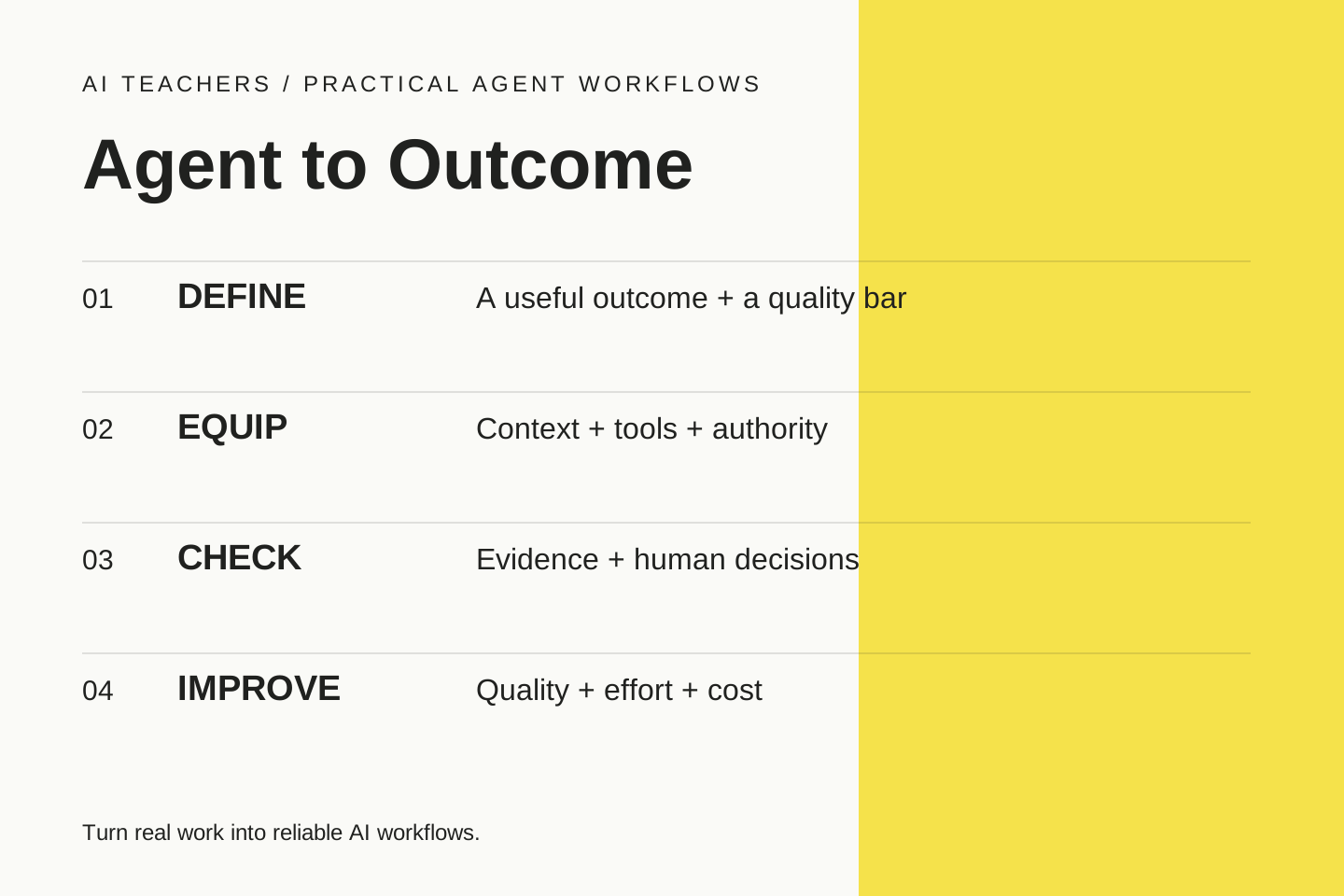
Choose one bounded task, give the agent relevant context and limited authority, then test the actual result. Keep human approval at meaningful decisions and measure the total effort needed to produce an accepted outcome.
An AI agent is most useful when you can describe the work well enough to recognize a good result. Start with a responsibility you understand: prepare a client brief, reconcile a small report, organize project notes or draft a follow-up. Keep the first attempt small enough to inspect yourself.
That is the premise of Agent to Outcome, a practical learning path from AI Teachers. The free tutorial, workflow planner and starter kit help you choose a job, equip an agent, check its work and improve the next run. A paid live workshop takes the same process into your own work.
Choose an outcome before a tool
“Use agents more” is hard to evaluate. “Prepare a weekly client brief with confirmed actions, source links and unanswered questions” gives you something concrete to check. Identify the audience, source material, expected output and the person accountable for it. Record the current effort so you have a meaningful comparison later.
Some tasks need only a conversation and a good brief. Others benefit from file access, a connector, a scheduled trigger or a workflow builder. A predictable process may work best with explicit steps. An agent helps when selecting the next action requires judgment. The simplest process that reliably meets your standard is a strong starting point.
Know which part you are choosing
The model interprets context and generates responses or tool calls. The harness is the surrounding software that runs the loop, manages state and provides tools and permissions. The application is the interface you use. A skill is reusable task guidance; a connector exposes specific data or actions. MCP standardizes how compatible applications discover and use tools and context.
A stronger model does not automatically grant better data, access or authority. A connected tool is useful only when the agent can identify the correct record, understand the permitted operation and verify the result. Keep those decisions visible in a workflow map.
Compare today’s options by the job
ChatGPT Work and Claude’s Cowork capabilities support multi-step knowledge work and finished files. Codex and Claude Code provide development-oriented workflows, although Codex overlaps with Work beyond coding. Claude Design supports visual artifacts and prototypes. Dots, Muse, Claude Duet and Grok Bot offer persistent-agent patterns; access and controls differ.
The products are changing. Anthropic is merging Chat and Cowork for eligible accounts, and Claude Duet launched as a research preview with a waitlist. Our dated tool guide links to the official documentation. It is a comparison of capabilities and fit, not a claim about popularity or guaranteed performance.
Give context without opening everything
Supply the current brief, relevant definitions, approved source files, output examples and decision rules. State which source wins when information conflicts. Exclude unrelated records and secrets. Treat retrieved emails, webpages and documents as evidence to inspect, not instructions that can change the agent’s authority.
Start with reading and drafting. Connect one tool when it solves a real bottleneck. Check the exact account, record scope and allowed action. A product’s cloud computer and your local computer are different execution environments; do not assume that closing a laptop, changing device or naming a second agent changes access in the way you expect.
Make human checkpoints specific
“Ask me first” is incomplete unless you define what requires approval and what the person sees. Before an email is sent, show the final text, recipients and attachments. Before a database update, show the record and change. Before a purchase, show the amount and merchant. Configure the control at the actual action where your platform supports it.
The human remains responsible for priorities, commitments and important judgments. The agent can prepare options and carry out bounded work. An approval must cover the intended action; an uncertain result should be checked before retrying a write that could create duplicates.
Test what happens when the easy case breaks
Run a normal example, then missing data, conflicting facts, an unavailable tool and an instruction hidden in source material. Inspect the actual result and relevant activity log. Check that the agent stopped where it should. A classroom test is a learning exercise, not proof of production security.
Measure preparation, waiting, review, rework and usage. Include every subagent and retry in cost. Keep a small set of representative cases and rerun them after changing instructions, models, tools or permissions. Improve one thing tied to an observed failure.
Build the relationship through practice
Start with the free 45-minute tutorial, then download the editable starter kit. You will practice with fictional notes, review source-backed actions and deliberately introduce a contradiction. Transfer the method to one real responsibility when you are ready.
For guided practice, ask about the next Agent to Outcome workshop. For implementation or a team program, explore Waymaker Agency’s agent workflow services. Both are part of Ashley’s teaching and implementation work.
Questions you might be asking
Do I need a new AI subscription?
No new product is required for the basic document exercise. Use an approved assistant you already have, and verify product access and costs before a connected workflow.
Does the workshop include production automation?
The core workshop develops and tests a bounded workflow. Production connections, ongoing operations and broader implementation are separately scoped.
Sources and further reading
- Anthropic: building effective agents
- Anthropic: evaluation against actual agent outcomes
- OpenAI: agent usage and observability
- OpenAI: ChatGPT Work
- Anthropic: Cowork and Chat transition
- MCP: architecture
Sources checked October 22, 2026. Review the linked publisher information for current details.
Put one idea to work
Use one lesson in a small project, explain what you learned, and practice again without relying on the answer.
Try the free workshop →Explore more from AI TeachersGet the free AI at Work Starter Kit →Keep practicing
 Learning With AI
Learn Something Useful With AI Every Day: A Small Routine That Builds Real Skill
Use a short daily AI learning routine with an initial attempt, hints, practice and an independent check so progress means more than reading answers.
October 22, 2026 · 6 min read Freelance work
Learn Upwork MCP by building an evidence-based freelance proposal
A practical Upwork MCP workflow for adult learners developing practical AI skills: project fit, honest proposals, bid review, portfolio evidence, and a small side-work test.
October 20, 2026 · 4 min read