Give AI a bounded assignment, supply the inputs, and check the result before using it.
Start with a useful result
If you have asked AI for help and received an answer that sounds reasonable but is hard to use, the missing piece may be the assignment. “Help with my workshop” leaves hundreds of choices unresolved. “Use this agenda to create a participant worksheet for a 60-minute beginner session” gives the work a shape.
An AI agent is software that can use tools and carry out several steps toward a goal. What it can actually do depends on the product, the tools connected to it, and the access you allow. The word agent alone tells you very little about whether it can finish your particular task.
Five terms you can put to work
| Term | Plain meaning | Example |
|---|---|---|
| Prompt | The instruction you give | Create a worksheet from this agenda |
| Context | Information needed to do the job well | Audience, examples, length, and learning goal |
| Tool or connection | A way to read information or take action | A file reader or an approved browser connection |
| Workflow | The sequence used to produce and check a result | Read the agenda, draft, check, revise |
| Acceptance criteria | The conditions that make the work usable | Three exercises, clear instructions, and an answer guide |
Try a worksheet you could teach from
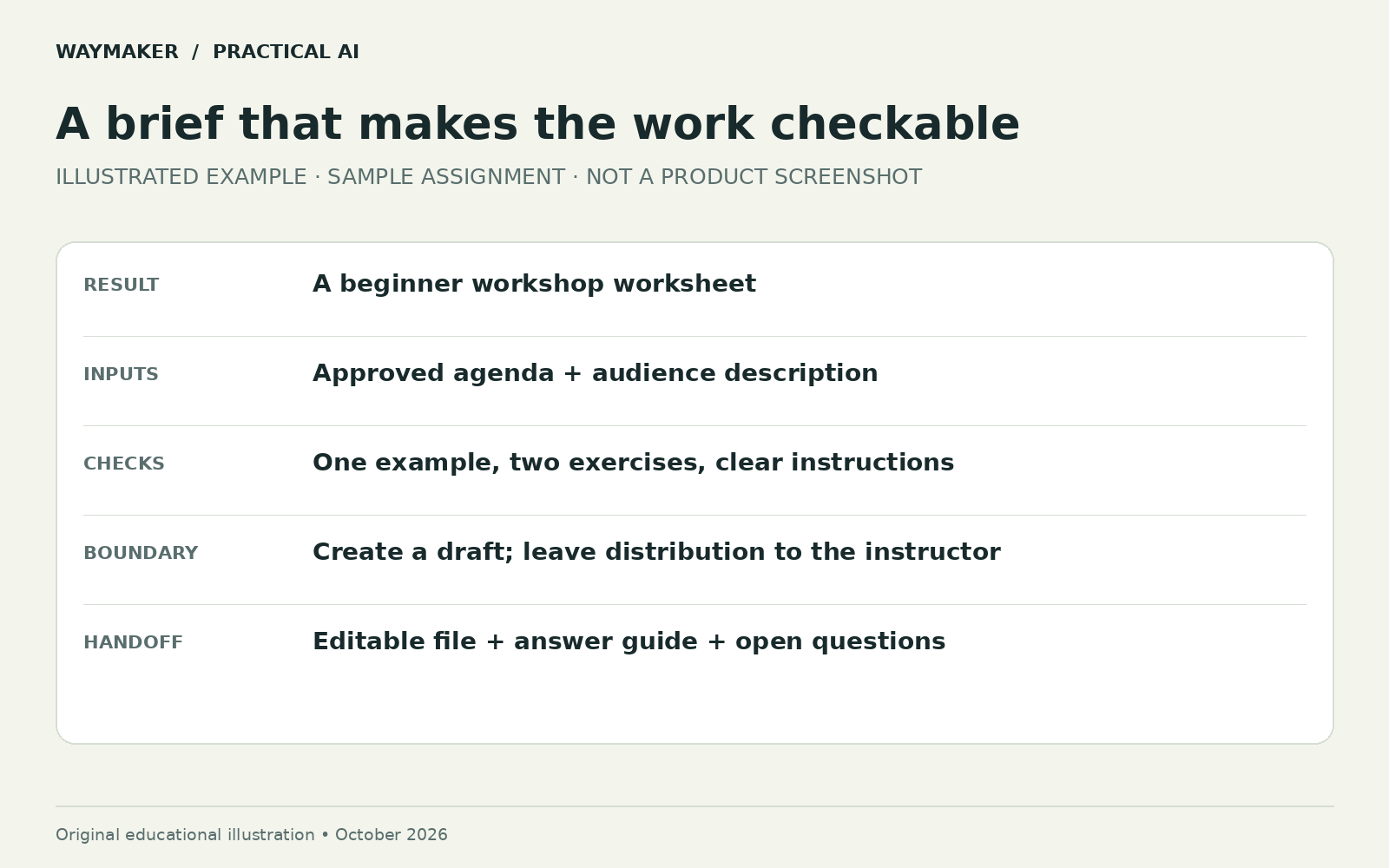
Use a short agenda you own, or write a fictional one for practice. Describe the audience’s starting knowledge. State the learning objective as an action: participants should be able to write a clear task brief. Ask for a worksheet with room to practice and an answer guide you can review separately.
Use the attached agenda to create a worksheet for adult beginners.
The learning goal is to write a clear AI task brief.
Include one worked example, two practice exercises, and a review checklist.
Use familiar language and explain any technical term on first use.
Keep the participant worksheet to two pages if the layout allows.
Create a separate answer guide and identify any assumptions you made.
Check that each exercise supports the learning goal.
Save an editable file. Do not email it or publish it.
The last line is a boundary for this exercise. It allows useful preparation while keeping distribution under your control. For another task, the boundary may differ. Spell it out instead of expecting the software to infer your teaching or business preferences.
Choose a place to do the work
OpenAI describes ChatGPT Work as a way to complete substantial tasks using files and approved tools. For this exercise, it can be the place where you request the worksheet and review the resulting file. Get started with ChatGPT Work.
Start with the file you already have. A browser connection is useful only if a required source or action is on a webpage. You do not need to connect every account to complete a worksheet. The companion setup guide explains how Work, Dot, and browser access differ.
Check three things before calling it finished
Content: Does the worksheet teach the stated skill? Check any facts and references against the originals. If the answer guide contains an instruction that the participant never received, the exercise is incomplete.
Usability: Could someone follow the instructions without you translating them? Check space for answers, reading order, text size, and whether the worked example prepares learners for the next exercise. Open the actual file; a description of the layout is not a layout check.
Fit: Is the task appropriate for this audience and time limit? A beautiful worksheet may still require knowledge the learners do not have. Your judgment about the people in the room is part of the review.
Give feedback that changes the output
“Make it better” is hard to act on. Try: “Exercise two introduces three unfamiliar terms. Replace it with a booking-page example, define the terms, and keep the same learning goal.” Name the problem, the desired change, and what should stay consistent.
If the same mistake appears twice, inspect the brief and source material. The software may be missing a crucial example or misreading a constraint. Endless rewrites are usually less useful than a clearer input.
Repeat once before saving a routine
Run the assignment with a second agenda. Keep the useful instruction, replace the source file, and see what breaks. Record how long you spent preparing and reviewing the output. If the workflow produces a usable worksheet consistently, save the brief as a reusable template.
Later, Dot could help track a recurring preparation task. Its documentation distinguishes saved schedules from conversational requests, so verify the schedule and an actual result before relying on recurrence. Dot tasks and memory.
For today, success is simpler: you have one usable file, you know how it was checked, and you can explain what you would change next time. That is a meaningful first agent workflow.
Bring a real task to an AI Teachers working session, or use the exercise above as your next practice lesson.
Companion guide: how Dot, Work, and browser access fit together.
Prompts to put it into practice
Replace the brackets with your context. Use information you have permission to share.
A clear first assignment
Use [approved input] to create [deliverable] for [audience]. Include [requirements]. Mark missing information. Return a draft and a short list of checks I should make.
Try it on your work
Choose one task, run it once, and record preparation, review, and correction time.
Check the result
- The output matches the assignment.
- Names, dates, numbers, and links match the source.
- Missing facts remain visible.