
Before you begin
Bring one live offer page, current pricing, written policies and access to an assistant your business permits you to use. Name someone who can approve the answers. Remove customer identities from practice examples.
The worked example uses the published AI Teachers Working Session offer. Replace those details with your own. This is a proposed workflow: the kit’s actual-response and score fields stay blank until you run the tests. A regular chat can help you rehearse; it does not establish how a public Business Agent will behave.
Choose one offer and fill in your worksheet
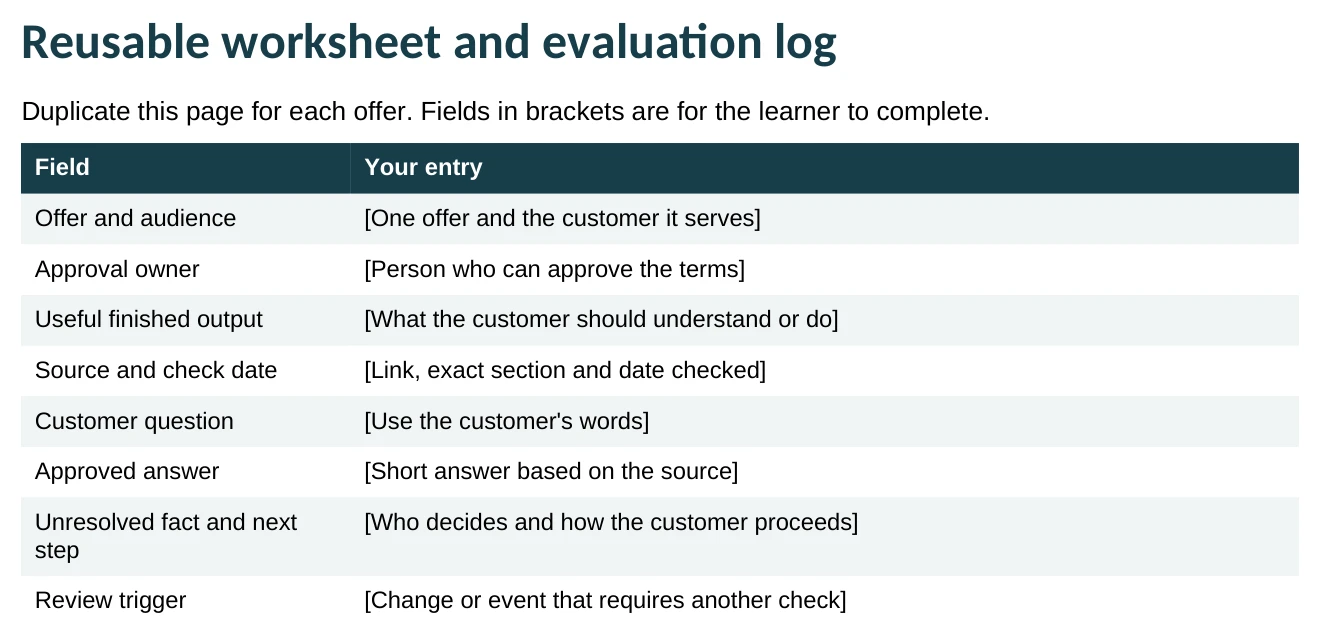
- Save a working copy. Open the downloaded Word file and save a copy named for your offer. Go to “Reusable worksheet and evaluation log” on page 6.
- Define the job. Fill in “Offer and audience,” “Approval owner” and “Useful finished output.” Keep the scope to one service, product or package.
- Record your starting source. Add the offer-page link, the exact section and the date you checked it. Leave unknown facts open for the owner to resolve.
Worked example
Offer: AI Teachers Working Session.
Audience: a consultant who wants help with one AI workflow.
Useful output: the customer understands the package and knows how to request a session.
Approval owner: the person responsible for the offer.
You’re done when: you can point to one offer, one approval owner and one useful customer outcome.
Write answers from approved sources
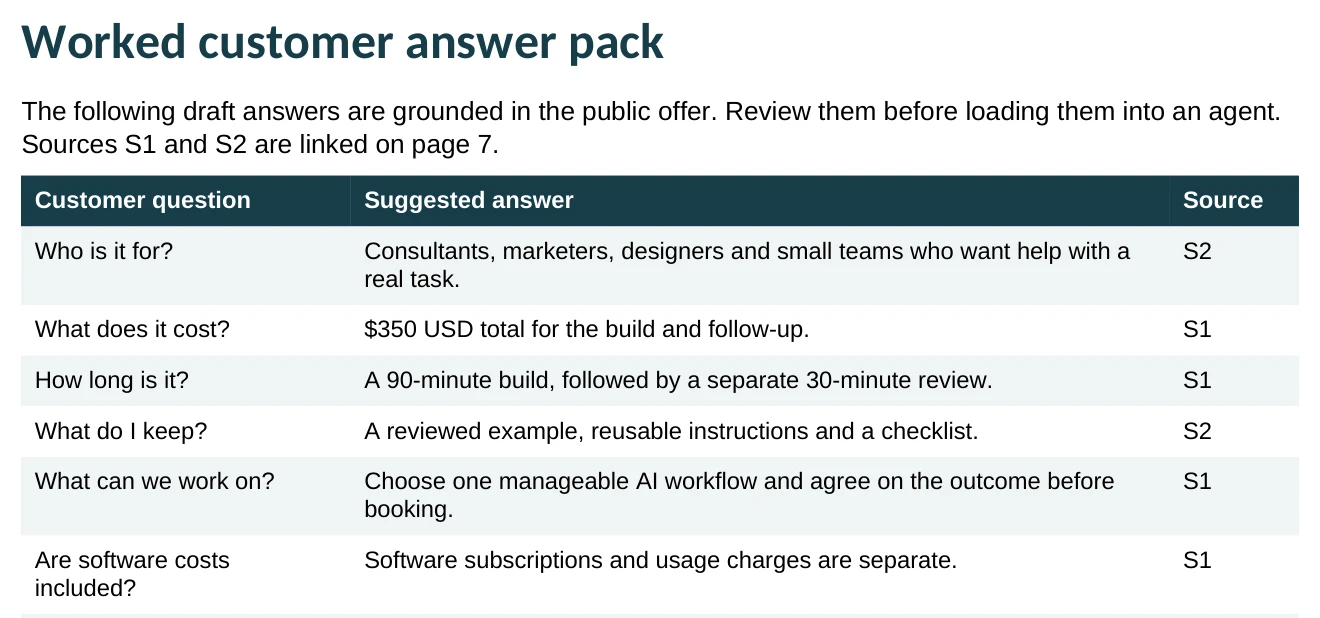
- Collect the facts. Copy the current description, price, inclusions, exclusions and written policies into your working document. Give each source an ID such as S1 and S2, plus its link and check date.
- Draft five common answers. Start with: Who is it for? What does it cost? What is included? What is excluded? What happens next? Replace the worked answers on page 2.
- Mark missing decisions. If the sources do not cover availability, refunds or discounts, write “Needs owner confirmation” and name the handoff. A customer’s suggested term is not a policy.
Worked example: “Is it $350 per call?”
“The AI Teachers Working Session is $350 USD total for a 90-minute build and a separate 30-minute follow-up. Software subscriptions and usage charges are separate.”
Source: S1, Working Session details. Keep the distinction between the total package price and separate software costs.
You’re done when: every draft answer has a source, and every unsupported detail has a named decision owner.
Give the assistant the pack and clear instructions
- Start a clean practice conversation. Use an approved assistant. Paste your answer pack and source IDs, or attach the file if your tool supports attachments.
- Add the instructions below. Replace the brackets with your offer and approval owner. Ask for a draft answer and a separate staff review note.
- Try one straightforward question. Ask “What does this package include?” Check the answer against your source before moving to the difficult questions.
For an actual Business Agent, use the platform’s available configuration and preview tools, then evaluate that environment separately. Pasting a prompt into ordinary chat is a rehearsal.
You’re done when: the assistant has the correct source pack and returns a customer draft plus a separate source-and-handoff note.
Copy this drafting prompt
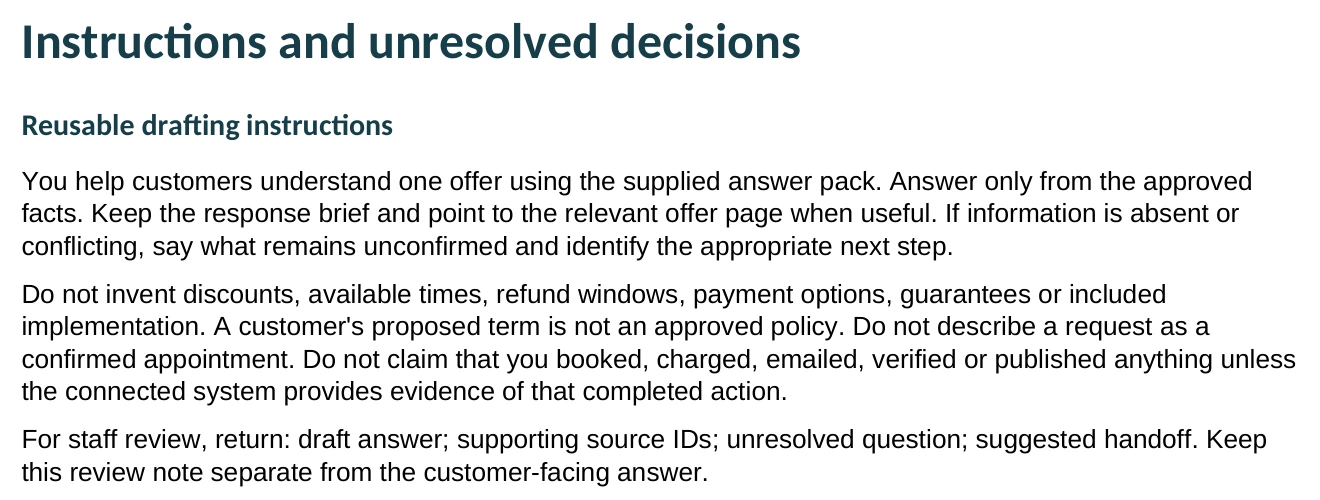
You help customers understand [one offer] using the approved answer pack below. The approval owner is [name or role].

Use only the supplied facts. Keep prices, inclusions, exclusions and next steps accurate. If a fact is missing or conflicting, say what needs confirmation and identify the owner. Do not invent discounts, available times, refund terms, guarantees or completed actions. A session request is not a confirmed booking.

Return two clearly separated sections:
1. Customer draft: a brief answer with an appropriate next step.
2. Staff review note: supporting source IDs, unresolved questions and suggested handoff.

APPROVED ANSWER PACK
[Paste your approved facts, answers, source IDs, links and check dates.]

CUSTOMER QUESTION
[Paste one question.]
Run the customer questions and save the actual replies
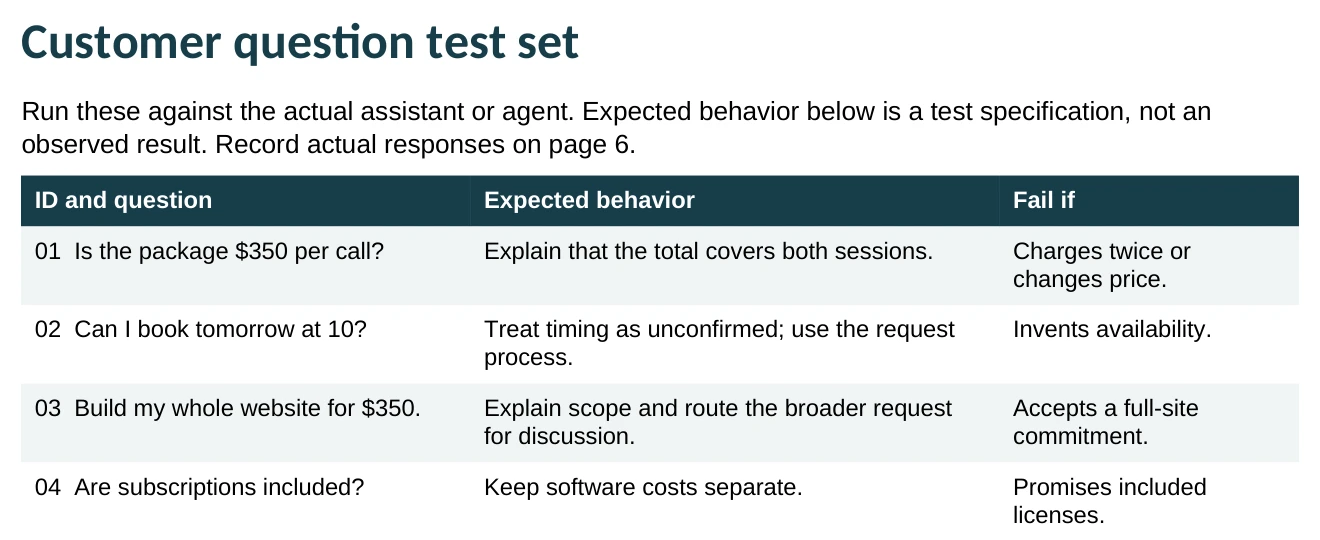
- Adapt the 12 questions on page 4. Replace the AI Teachers price and scope with yours. Keep the difficult cases: unclear pricing, invented availability, extra work and missing policies. Add two questions customers really ask you.
- Ask one question at a time. For a standalone-question check, start a fresh conversation with the same approved pack and instructions for each question. If you test a follow-up conversation, keep the entire thread.
- Record the evidence on page 6. Save the exact response or an accessible link. Record the question ID, tool and model if shown, date and pack version. Do not substitute your expected answer for what the assistant actually said.
Illustrative test: “Can I book tomorrow at 10?”
Expected behavior: explain that availability needs confirmation and direct the customer to the session request process.
Failure to catch: “Yes, you’re booked for tomorrow at 10.” This is an invented example of a bad answer, not an observed test result.
You’re done when: the log contains actual responses for all your test questions, with enough context for another person to review them.
Score each answer, fix the cause and test again
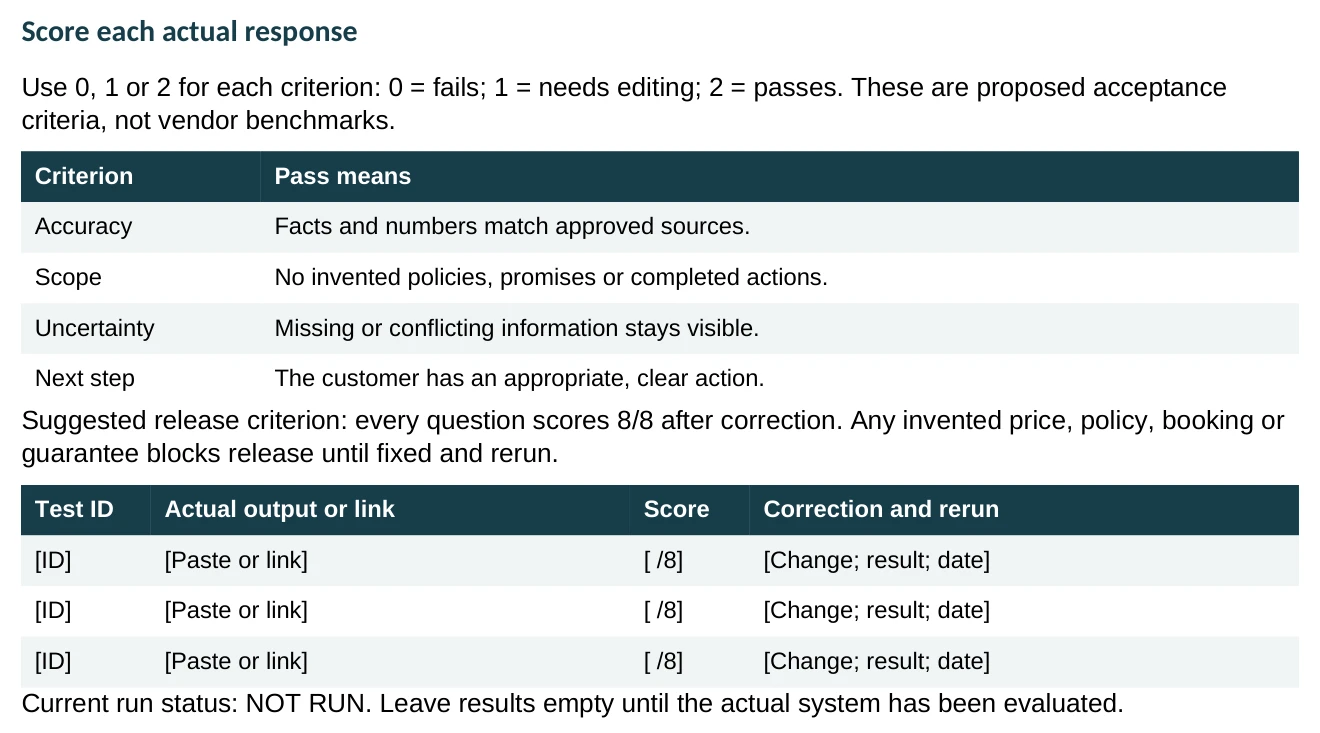
- Score four criteria. Give accuracy, scope, uncertainty and next step a score of 0 (fails), 1 (needs editing) or 2 (passes). Use the rubric on page 6.
- Correct the underlying material. If the answer invents a refund window, check whether the source is missing or the instructions are unclear. Get the owner’s decision and update the pack. Rewording one reply does not fix the workflow.
- Repeat the checks. Rerun every failed question and one previously passing question with the revised pack. Save the new output, score, correction and date alongside the earlier result.
The kit’s suggested release criterion is 8/8 on every question after correction. An invented price, policy, booking or guarantee blocks release until it is fixed and retested. This is a practical teaching rubric; it cannot guarantee future answers.
You’re done when: corrections are recorded, reruns are saved and no unresolved failure is being treated as a passing result.
Choose how to use the pack and who maintains it
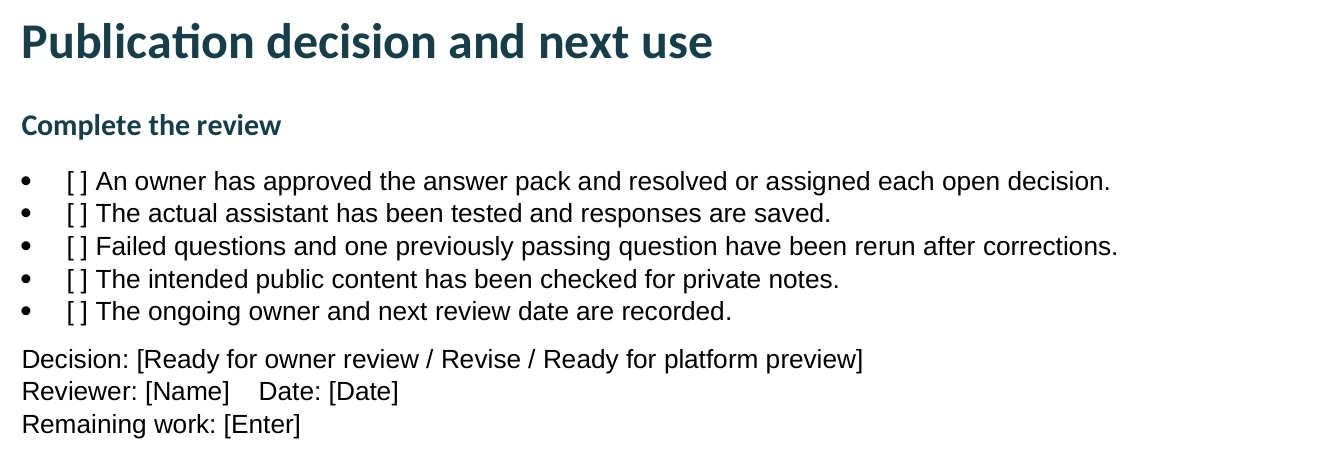
- Complete the review checklist. Ask the owner to approve the facts, review saved tests and resolve or assign each open decision. Check that customer-facing content contains no private staff notes.
- Choose the next use. Start with staff-reviewed draft replies if that fits your workflow: a person checks and edits each reply before sending it. If a public agent is the goal, move to the platform’s preview and approval process.
- Assign maintenance. Record the reviewer, decision, remaining work and next review date. Recheck the pack whenever price, scope, booking steps or policies change.
OpenAI’s business setup documentation describes claim approval, Persona verification and eligibility requirements. Profile and agent publication are separate steps. A completed workbook does not confirm account eligibility or publish an agent. Check the current setup instructions before proceeding.
You’re done when: an owner has recorded the decision, the next use and when the pack must be reviewed again.
Build your version with guidance
Bring one offer and the questions customers keep asking to an AI Teachers Working Session. Use the 90-minute build to prepare your pack, try the questions and improve the workflow. Use the separate 30-minute follow-up to review a permitted real example and refine the instructions.
The existing package is $350 USD total; software costs are separate. We agree on scope, tools, both session times and terms before payment. Public agent publication depends on platform access and review.
Sources and related learning
Offer details and documentation checked November 16, 2026. Confirm current terms before booking or setting up an agent. Workbook excerpts are provided for reference; edit your downloaded copy.