Practical AI foundations
Your AI Can Read a PDF and Still Miss the Point
Prepare business documents for AI answers. Preserve tables, sources, versions and permissions, then test retrieval and answers with a practical checklist.
In this guide
What makes a business document ready for AI?
Check the path from the source page to the answer: extraction, structure, retrieval, freshness, access and supporting evidence. Preserve tables and qualifying notes, identify the authoritative version, enforce permissions and test representative questions before expanding the collection.
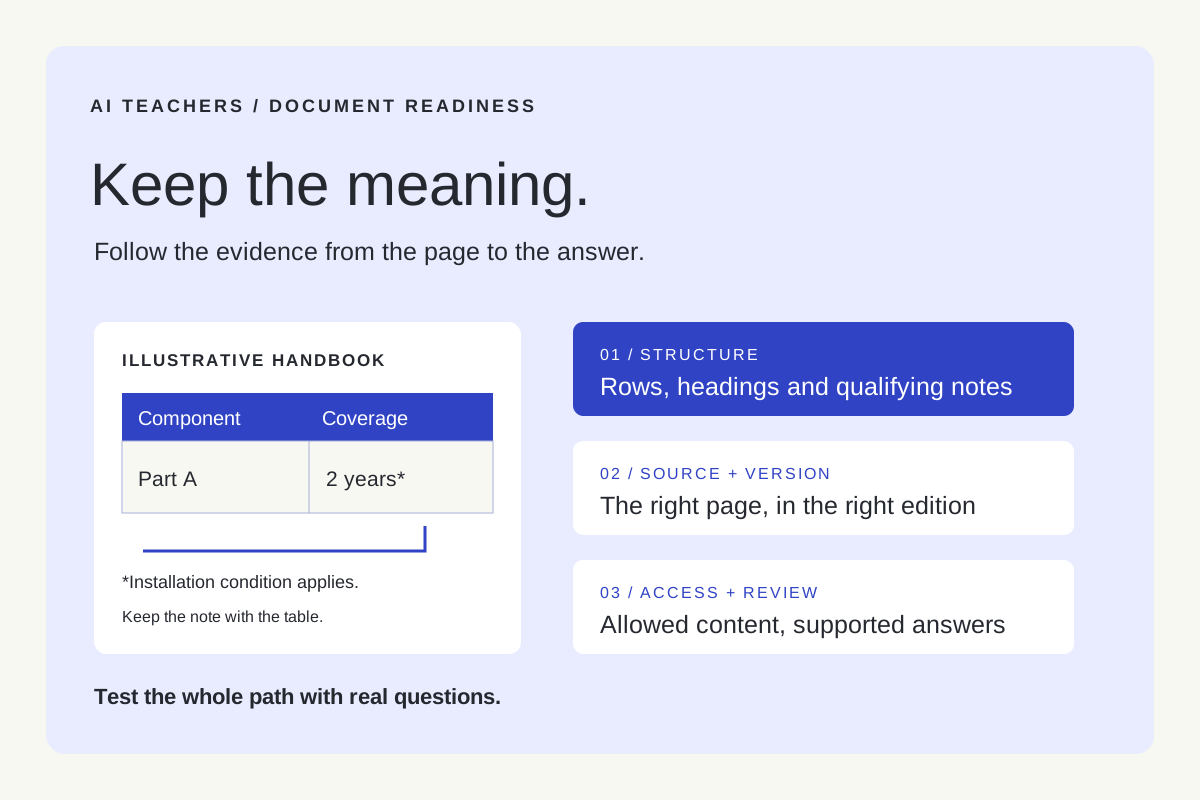
Imagine a fictional service handbook with a warranty table. One row says a component is covered for two years. A footnote limits that coverage to a particular installation method.
An AI assistant extracts “two years” and gives a confident answer. The words were present, but the condition connecting them was lost.
That example suggests a useful first move when a document assistant disappoints: inspect what happened between the original page and the final answer.
Follow the evidence through the process
A document question passes through several stages. A weakness at one stage can appear as an answer problem at the end.
| Stage | Illustrative failure | A useful check |
|---|---|---|
| Extraction | A scanned digit is read incorrectly | Compare extracted values with the page image |
| Structure | A footnote becomes separated from its table | Inspect headings, rows, units and attached notes |
| Retrieval | The relevant exception never reaches the model | Review the passages selected for the question |
| Freshness | An obsolete handbook supplies the answer | Check effective dates and replacement relationships |
| Access | A user receives a restricted passage | Test retrieval using that user’s permissions |
| Answer | The model adds an unsupported conclusion | Match each material claim to the cited evidence |
This table is a diagnostic starting point. Changing a prompt may help the final stage while leaving an earlier failure untouched.
Microsoft’s Document Intelligence layout documentation describes extracting text, tables and document structure. Google’s layout parser documentation explains how layout and contextual relationships can inform document chunks. These capabilities help preserve information; the selected tools still need testing against your actual documents.
Start with one document family
Choose a bounded collection, such as service handbooks or approved operating procedures. Name someone who understands the content and can decide which version is authoritative.
Create a simple register before loading the collection. For each document, record its owner, source location, effective date, version, access group and review date. Add which document it replaces, where applicable.
Keep drafts and superseded material distinguishable from current instructions. An older document may be useful for historical questions, but the assistant needs enough metadata to recognize that role.
This is also a chance to resolve contradictions a person would struggle with. If two approved procedures disagree and neither takes precedence, record the conflict and assign an owner to resolve it.
Preserve meaning as well as words
Inspect a few representative pages after extraction. Include a dense table, a scanned page and a section containing an exception.
Check that a table’s values still connect to the right row labels, column headings and units. Confirm that notes remain associated with the statements they qualify. Check reading order on pages with multiple columns.
For retrieval, a chunk is a portion of content that can be selected to help answer a question. Choose boundaries that keep a useful unit together: a procedure step with its warning, for example, or a table row with enough header context to interpret it.
Keep a path back to the original source. A retrieved passage should carry a document identifier, version and useful page or section reference. Where extraction is uncertain, preserve that uncertainty so a reviewer knows what to check.
Better OCR cannot resolve an outdated policy. Smaller chunks cannot recover a missing footnote. Diagnose the specific failure before changing the whole system.
Keep access and updates connected
Document permissions should apply to retrieved passages as well as complete files. Microsoft’s document access control guidance describes matching user identity against indexed permission metadata and notes that permission changes must be synchronized.
Ask your implementation owner how access is enforced before content reaches the model. Also ask what happens to indexed chunks, snippets and cached answers when a document is replaced, restricted or deleted.
Write down the expected behavior. “The original folder is private” does not tell you whether its copied content remains protected elsewhere.
Run a small readiness exercise
Select a few representative documents and build twelve test questions: two for each category below.
- Direct facts: Can the assistant find a clearly stated detail?
- Tables: Can it preserve the relationship between a value and its headings?
- Exceptions: Can it apply a qualifying note?
- Versions: Can it distinguish current guidance from historical guidance?
- Missing evidence: Can it say the collection does not establish an answer?
- Permissions: Does each test user receive only content they are allowed to access?
For each question, complete this record:
- Question and test user:
- Expected answer or expected refusal:
- Authoritative document, version and location:
- Passages actually retrieved:
- Final answer and citations:
- Failure stage and assigned correction:
Use an authorized test environment and sample accounts for permission checks. Decide expected answers with the content owner before running the test.
Score extraction, retrieval and the final response separately. A correct-looking answer supported by the wrong version needs attention. So does a good citation attached to a claim the source never makes.
Repeat the affected cases after a change, and retain the set for future document or system updates. Expand the collection when you can explain and control the failures you have found.
If your team would benefit from working through this process together, explore AI Teachers sessions. Bring one document family and the questions people actually need answered.
Sources and further reading
- Document layout analysis with Document Intelligence
- Process documents with Gemini layout parser
- Document-level access control in Azure AI Search
Sources checked November 8, 2026. Review the linked publisher information for current details.
Put one idea to work
Use one lesson in a small project, explain what you learned, and practice again without relying on the answer.
Try the free workshop →Explore more from AI TeachersGet the free AI at Work Starter Kit →Keep practicing
 Agent-friendly websites
Agent-Friendly Website Lesson: llms.txt and Task Testing
A hands-on lesson plan for llms.txt, accessible pages and public APIs, including a fictional site, a six-step exercise and an assessment rubric.
November 11, 2026 · 8 min read AI browser workflows
Teach a useful AI skill: read three tabs, check the answer, explain the choice
A practical browser-based AI lesson with five illustrated steps, ready-to-use prompts, a fictional pricing exercise, and a simple assessment of independent source checking.
November 11, 2026 · 8 min read