Team AI training
Teach Your Team to Evaluate AI Work
A practical lesson for turning a promising AI response into a repeatable workflow that people can explain, check, and improve.
In this guide
- What should the team learn to do?
- Choose a result the learner can recognize
- Give everyone the same imperfect source
- Write a brief with explicit boundaries
- Review against a short rubric
- Show what a checked result looks like
- Test a fresh example
- Measure the work people can use afterward
- Put this into practice
- Sources and further reading
What should the team learn to do?
Teach one recurring task with source notes, a short rubric and a checked example. Have learners explain each correction, then test on fresh notes to see whether the workflow transfers.
A participant finishes an AI workshop with a useful prompt and an impressive example. A week later, the task is slightly different. The notes are incomplete, the output sounds convincing, and nobody is sure what needs checking.
Training becomes more useful when people practice judging the work as well as producing it. They need to understand what a successful result requires, which facts the system can use, and what to do when the result falls short.
Spotify’s article on three perspectives in AI product management emphasizes how evaluation changes with the responsibility someone owns. For workplace learning, that suggests a practical exercise: let participants define the task, build a small workflow, and assess the result as the person who must use it.
The lesson below is an original teaching exercise. It uses a fictional client follow-up so a team can practice without exposing real client information.
Choose a result the learner can recognize
Start with a recurring task and a specific output. “Use AI for productivity” is too broad for a working session. “Turn meeting notes into a follow-up email and action list” gives participants something concrete to produce and evaluate.
A useful result should preserve agreed decisions, assign actions only when the notes support them, and keep unresolved questions visible. The recipient should be able to understand what happens next.
Ask learners how they would review the same work if a colleague wrote it. Their answers help establish a practical quality standard before the AI generates anything.
Give everyone the same imperfect source
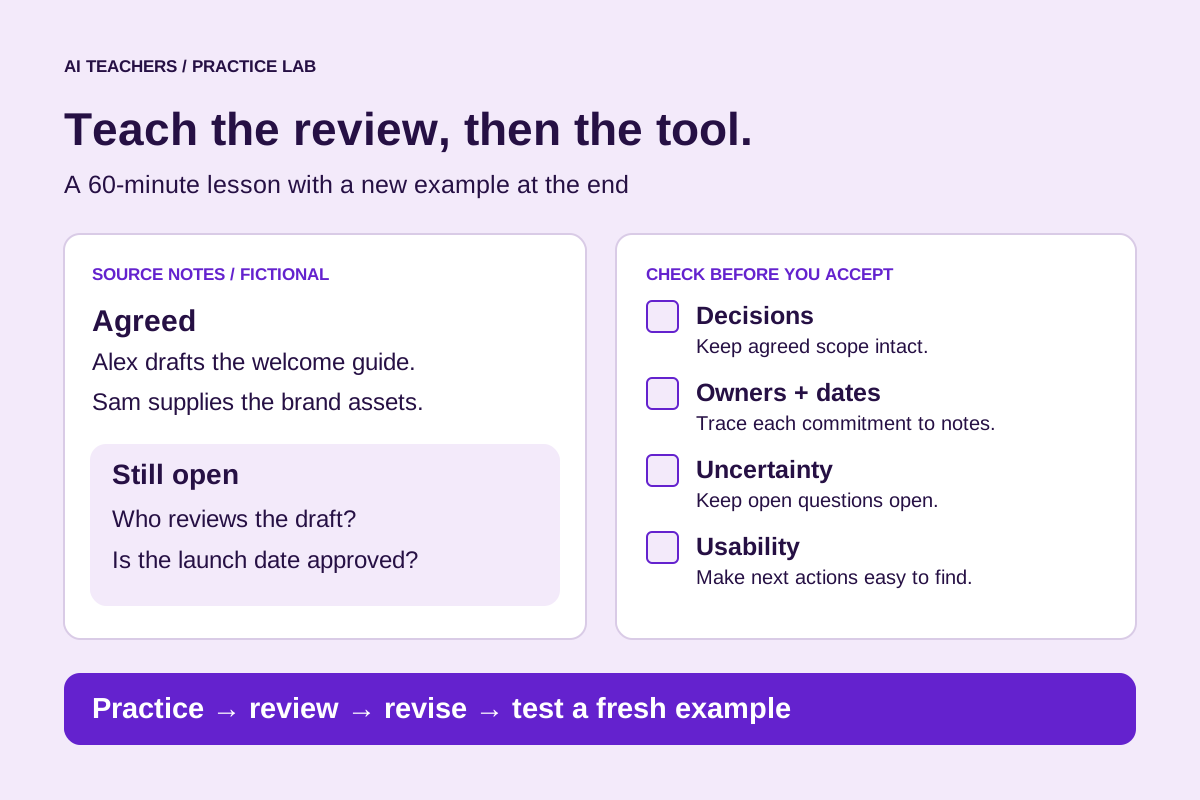
Use these fictional notes:
- The client wants a one-page welcome guide using the existing signup form.
- Alex agreed to draft the guide by November 18.
- Sam agreed to send the approved brand assets by November 16.
- Someone suggested launching on November 23. The date was not agreed.
- The group did not decide who would review the draft.
These notes contain enough information to create a useful follow-up, plus two uncertainties the learner must preserve. The challenge is to keep the proposed launch date tentative and the reviewer unassigned while still producing a clear message.
Ask participants to mark the agreed facts before opening the AI tool. This gives them a reference for checking the result and makes the review less dependent on how polished the language sounds.
Write a brief with explicit boundaries
Give learners a starting instruction they can adapt:
“Use the meeting notes below to draft a concise client follow-up email and a separate action list. Preserve agreed decisions, owners, and dates. Do not invent missing information. Keep suggestions separate from commitments. Put unresolved decisions under Open questions. Include a note reference for each action in the review copy. Do not send the message.”
The instruction describes the output, the evidence to use, and how to handle uncertainty. Learners should still inspect the result. A well-written instruction expresses the intended behavior; it does not guarantee that every output will meet it.
During practice, use fictional information or material approved for the tool and setting. Teams can introduce appropriate real examples once the process for handling their information is clear.
Review against a short rubric
An evaluation rubric is a set of criteria for judging the result. Keep it close to the task so learners can explain each decision.
| Criterion | What a passing result does | What would need correction |
|---|---|---|
| Decisions | Preserves the agreed scope | Adds a deliverable nobody agreed to |
| Owners and dates | Uses the assignments in the notes | Invents an owner or deadline |
| Uncertainty | Keeps launch and review decisions open | Presents a suggestion as confirmed |
| Usability | Makes the next actions easy to identify | Buries actions in a vague recap |
For this exercise, invented commitments are a critical failure. A pleasant tone does not compensate for them. Other issues, such as wordiness, can be recorded separately so the learner can prioritize corrections.
Have participants identify the source evidence for each action. If two people disagree about a score, discuss which criterion was ambiguous and improve the rubric. That conversation teaches the judgment the workflow depends on.
Show what a checked result looks like
A reviewed email could read:
“Hi Sam,
We agreed to create a one-page welcome guide using the existing signup form. I’ll draft the guide by November 18, and you’ll send the approved brand assets by November 16.
We still need to confirm who will review the draft and whether November 23 works as the launch date.
Thanks,
Alex”
The separate action list would contain Alex’s draft and Sam’s asset handoff. Selecting a reviewer and confirming the launch belong in open questions because the notes do not establish owners or agreement for them.
Ask learners to explain why that distinction matters. It connects a writing choice to a real consequence: avoiding a commitment the client or team did not make.
Test a fresh example
After revising the workflow, give participants a new set of notes they have not practiced on. Include a changed deadline, a missing owner, or a statement that contradicts an earlier suggestion.
The new example helps reveal whether the instructions and review process transfer to another task. Repeated success on the original notes only shows that the team improved that example.
Record the errors found and the changes needed. If the system misses the same distinction repeatedly, simplify the workflow or make that review step more explicit. Learners should know when completing part of the task manually is the more useful choice.
Measure the work people can use afterward
For this lesson, a proposed 60-minute structure is 10 minutes to define the output, 10 to inspect the notes, 15 to generate and review, 15 to revise and test a fresh example, and 10 to document the process.
Evaluate whether participants can find an invented commitment, explain an unresolved question, and complete a new example with a usable result. If you compare timing, measure the full task, including review and correction.
Each learner should leave with the instructions, a checked example, the rubric, and a short note about situations that need extra attention. Ask them to try the process on an appropriate task and bring one difficult case to the next session.
That follow-up turns the lesson into a process the team can keep improving. It also gives the trainer evidence about what participants can do when the original demonstration is no longer in front of them.
Put this into practice
Try the client-call follow-up workflow for a complete worked example, or build a process around your own task in an AI Working Session. For the measurement step, read How to Tell Whether an AI Feature Creates Business Value.
The lesson, source notes, prompt, rubric, and sample email are original teaching materials. The 60-minute schedule is a proposed lesson plan, not a reported training result.
Sources and further reading
Sources checked November 16, 2026. Review the linked publisher information for current details.
Put one idea to work
Bring a recurring task and leave with a working AI-assisted process, review criteria and a written handoff.
Explore an AI Working Session →Explore more from AI TeachersGet the free AI at Work Starter Kit →Keep practicing
 Agent-friendly websites
Agent-Friendly Website Lesson: llms.txt and Task Testing
A hands-on lesson plan for llms.txt, accessible pages and public APIs, including a fictional site, a six-step exercise and an assessment rubric.
November 11, 2026 · 8 min read AI browser workflows
Teach a useful AI skill: read three tabs, check the answer, explain the choice
A practical browser-based AI lesson with five illustrated steps, ready-to-use prompts, a fictional pricing exercise, and a simple assessment of independent source checking.
November 11, 2026 · 8 min read